
Elementor New Features 2026: Everything You Need to Know
Today, building a website has become much easier than before. A few years ago, if someone wanted to create a professional website, they needed knowledge of HTML, CSS, JavaScript, and WordPress development. Even creating a simple homepage required coding, and making small design changes often required help from a developer. However, the situation has changed a lot now.

Today, many website builders are available in the market, but for WordPress users, Elementor has become the most popular and powerful page builder. The biggest reason for its popularity is that Elementor makes website design simple and easy. You can create professional pages without coding by using its drag-and-drop system.
I personally use Elementor in many WordPress projects, and based on my experience, it is an excellent tool for both beginners and professional developers. Whenever I need to create a landing page, business website, or portfolio website for a client quickly, Elementor makes the development process much faster and more efficient.
In 2026, Elementor is no longer just a page builder. It now includes powerful AI features that help with content writing, image generation, custom code creation, and website design. These features make the website creation process faster and more productive. Because of this, Elementor has become a valuable tool for bloggers, freelancers, agencies, business owners, and developers.
In this complete guide, we will explore Elementor from beginner level to advanced level in detail. After reading this article, you will have a clear understanding of almost everything you need to know about Elementor.
New users can explore Elementor and its AI tools from the official website: Visit Elementor Official Website
What Is Elementor
Elementor is a drag-and-drop WordPress page builder plugin that gives users the freedom to design websites visually. This means you do not need coding skills to create a website. You can move elements directly on the screen and see changes in real time while designing your pages.
If you use the default WordPress editor, design customization can sometimes feel limited. However, Elementor gives you complete visual control over your website design. You can easily add headings, images, videos, buttons, forms, testimonials, pricing tables, and many other design elements without writing any code.
The Elementor interface is beginner-friendly and easy to understand. Because of this, people who are building a website for the first time can learn Elementor quite quickly. At the same time, professional developers also use Elementor because it helps improve development speed and makes website creation more efficient.
Millions of websites around the world are built with Elementor, and it has become a trusted solution in the WordPress ecosystem. Its combination of ease of use, flexibility, and powerful features makes it one of the most popular website-building tools available for WordPress users today.
Why Is Elementor So Popular
If you follow the WordPress community, you have probably heard about Elementor. However, the question is why Elementor is so popular when many other page builders are available in the market.
The first reason is its ease of use. Many page builders can feel complicated for beginners, but Elementor has a simple and intuitive interface. Users can quickly understand how the platform works and start building pages without a steep learning curve.
The second reason is its live editing system.
When you edit a page, the changes appear instantly on the screen. You do not need to open a separate preview window again and again. This makes the design process faster and more convenient.
The third reason is its huge template ecosystem. Elementor provides hundreds of ready-made templates that you can import and customize. With these templates, you can create professional-looking pages in just a few minutes.
The fourth reason is its flexibility. Whether you are building a blog, creating an eCommerce store, designing a portfolio, or developing a business website, Elementor can be used effectively in almost every situation.
The fifth reason is Elementor AI, which is taking website creation to the next level. It helps users create content, generate code, and improve the overall design process. We will discuss Elementor AI in more detail later in this article.
How Does Elementor Work
Many beginners are often confused about how Elementor actually works. In simple words, Elementor works on the concept of sections, containers, and widgets.
First, you create a section or container on your page. Inside that section, you can create different layouts and organize your content according to your design needs. After that, you add widgets to the page. Widgets are the building blocks of a website.
For example, the Heading widget displays a heading, the Image widget displays an image, and the Button widget creates a clickable button.You can drag any widget and drop it into any area of your page. Each widget comes with its own settings that allow you to customize its content, style, spacing, colors, typography,
and other design options.This drag-and-drop approach makes website building much easier and more visual. Instead of writing code, you can design your pages directly on the screen and see the results instantly, which saves time and improves the overall website creation experience.
Elementor Free and Pro Version
Elementor is available in two versions. The first version is the Free version, and the second is the Pro version. One of the most common questions beginners ask is whether the free version is enough. If you are starting a blog or want to build a basic website,
Elementor Free is very useful. It allows you to create essential pages, add images, create buttons, and design responsive layouts without any coding knowledge. For many new website owners, the free version provides enough features to get started and build a professional-looking website.
However, as your website grows and your requirements become more advanced, the value of Elementor Pro becomes clear.
Elementor Pro includes powerful features such as Theme Builder, Popup Builder, WooCommerce Builder, Advanced Forms, Premium Widgets, and Dynamic Content. These tools give you greater control over your website design and functionality,
making it easier to create a fully customized and professional website.My personal recommendation is that beginners should start with the free version first. Once you understand the Elementor workflow and your website needs become more advanced, you can upgrade to the Pro version and take advantage of its additional features.
Elementor Official Website
How to Install Elementor
Installing Elementor is a very simple process and only takes a few minutes. First, open your WordPress Dashboard. After that, go to the Plugins section from the left sidebar menu. Click on the Add New Plugin option. In the search bar, type Elementor. You will see the Elementor Website Builder plugin in the search results.
Click the Install Now button.Once the installation is complete, click the Activate button. After completing these steps, Elementor will be successfully installed on your WordPress website and ready to use.If you purchase Elementor Pro, you will also need to upload the Pro plugin manually and activate it from the Plugins section. After activation, you can connect your Elementor account and unlock all Pro features.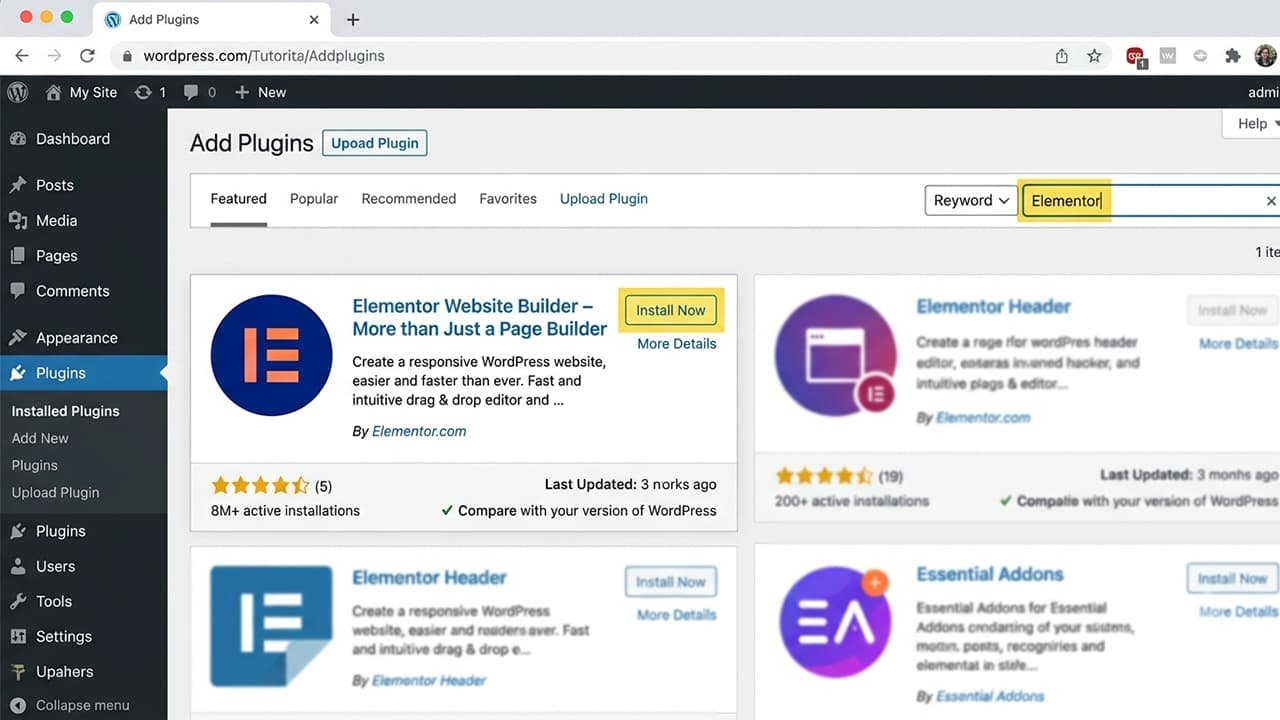
Understanding the Elementor Dashboard
When you open Elementor for the first time, the interface may look a little unfamiliar. However, you can understand its workflow within just a few minutes. On the left side, you will see the Elementor panel where all widgets are available. On the right side, you will see a live page preview where you can design your page and view changes in real time.
When you drag and drop a widget onto the page, its settings automatically open in the left panel.
Most Elementor widgets include three main tabs:
- Content
- Style
- Advanced
The Content tab allows you to manage the actual content of the widget, such as text, images, links, and other information. The Style tab lets you control the design and appearance of the widget. You can change colors, typography, backgrounds, borders, and other visual elements.
The Advanced tab provides additional customization options. Here you can manage spacing, margins, padding, motion effects, responsive settings, custom CSS, and other advanced features. Personally, I like this structure because it is easy to understand for beginners while still providing enough flexibility for advanced users and professional developers.
What Are Elementor Widgets
Widgets are one of the most important features of Elementor. If Elementor is compared to a building, widgets are like the bricks used to build that structure. Each widget has a specific purpose and helps you create different sections of your website.
Heading Widget
The Heading Widget is used to create page titles and headings.
Text Editor Widget
The Text Editor Widget is used to display paragraphs and written content.
Image Widget
The Image Widget allows you to add and display images on your website.
Video Widget
The Video Widget helps you embed videos from platforms such as YouTube and Vimeo.
Button Widget
The Button Widget is used to create call-to-action buttons that encourage visitors to take action.
Icon Widget
The Icon Widget allows you to add icons that improve the visual appearance of your pages.
Spacer Widget
The Spacer Widget helps create empty space between sections and elements, improving layout structure and readability.
Google Maps Widget
The Google Maps Widget allows you to display map locations directly on your website.
Testimonial Widget
The Testimonial Widget is used to showcase customer reviews and feedback.
Form Widget
The Form Widget helps create lead generation forms, contact forms, and inquiry forms.
Pricing Table Widget
The Pricing Table Widget is used to display pricing plans and service packages in a professional format.
By combining these widgets, you can design almost any type of webpage, including landing pages, business websites, portfolio sites, blog pages, online stores, and many other professional website layouts.
Understanding Elementor Containers and Sections
If you want to create professional website layouts, it is important to understand the concept of containers. In the past, Elementor mainly used a sections and columns system. Today, the container system has become more popular and is recommended for modern website design.
A container provides a flexible layout structure that helps you organize content more efficiently. It gives you greater control over the positioning and alignment of elements while making your designs more responsive.For example, if you are creating a Hero Section, you can place a heading, paragraph, and button inside one container.
In another container, you can add an image.This approach makes it much easier to create responsive designs that look good on desktops, tablets, and mobile devices.I use containers in almost all of my modern Elementor projects because they provide cleaner layouts, better flexibility, and improved website performance. They also make it easier to manage complex page designs without creating unnecessary layout issues.
What Are Elementor Templates
When designing a website, it is not always necessary to build everything from scratch. To solve this problem, Elementor provides ready-made templates. Templates are pre-designed layouts that have already been professionally created. Instead of starting with a blank page, you can import a template and customize it according to your needs.
This feature is especially useful for beginners because it helps them get started quickly without needing advanced design skills.
Using templates, you can create professional pages in a short amount of time, including landing pages, homepages, about pages, contact pages, service pages, and many other website sections.Templates not only save time but also help maintain a professional design standard throughout your website.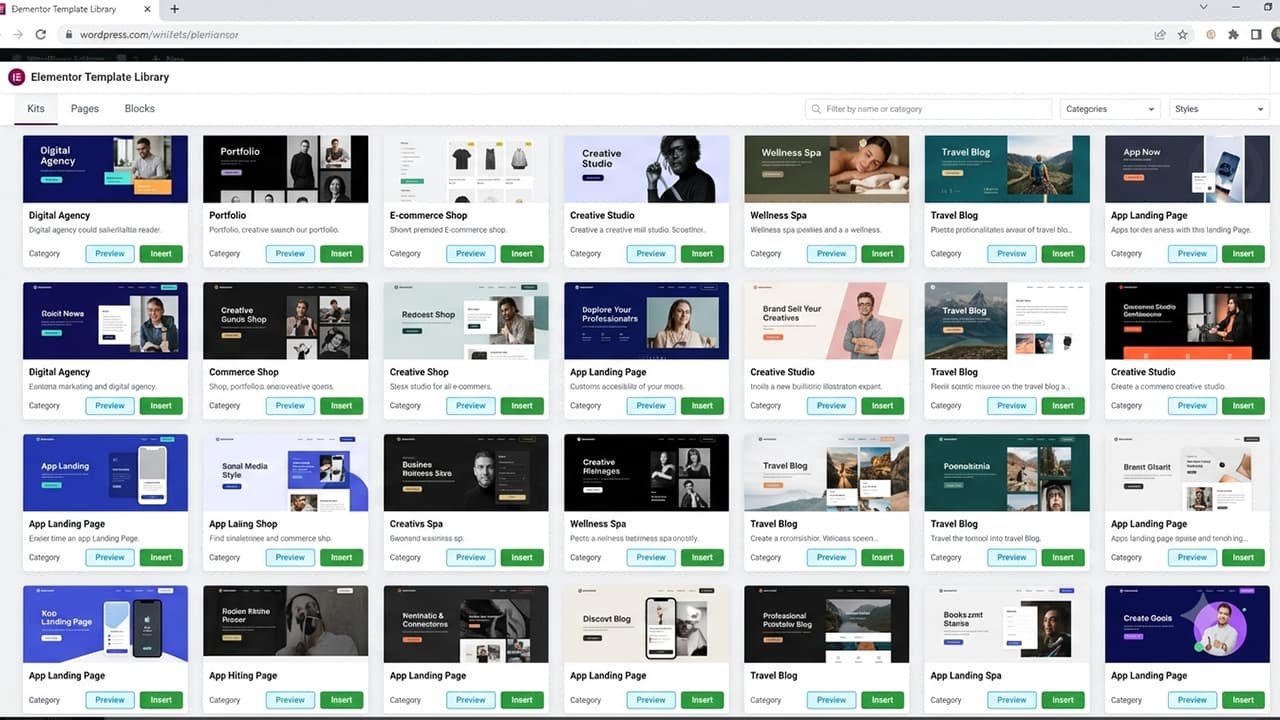
How to Create Your First Page with Elementor
If you are starting to learn Elementor, the best way to begin is by creating a simple homepage. To create a page, open your WordPress Dashboard and go to the Pages section. Click on Add New Page. Enter Home as the page title. After that, click the Edit with Elementor button. The Elementor editor will open, and you can start designing your page.
First, create a Hero Section at the top of the page.Add an attractive heading that clearly explains the purpose of your website.Below the heading, add a short description that provides more information about your business, service, or website.Under the description, add a button that encourages visitors to take action, such as contacting you, learning more, or viewing your services.
Next, create a Services Section where you can showcase the main services or features you offer.After that, add an About Section to introduce yourself, your company, or your brand.Then include your contact information so visitors can easily reach you.Once all sections are complete, review your design and make any necessary adjustments.
Finally, click the Publish button to make the page live on your website.This simple practice project is one of the best ways to learn Elementor because it helps you understand how sections, containers, widgets, spacing, and page layouts work together in a real website design.
Understanding Elementor Pro Features in Detail
When people start using Elementor, the free version is usually enough in the beginning. However, as a website grows and requires more advanced customization, the value of Elementor Pro becomes much clearer. When I create simple blogs or basic landing pages,
the free version is often sufficient. However, for client projects, business websites, membership sites, and eCommerce stores, Elementor Pro makes the entire development process much easier and more efficient. One of the biggest advantages of Elementor Pro is that it allows you to customize almost every part of your website visually.
You do not need to edit theme files repeatedly, and you do not have to hire a developer for every customization task.Elementor Pro provides advanced tools that help you create professional websites faster while maintaining complete design control. This is one of the main reasons why freelancers, agencies, developers, and business owners prefer the Pro version for serious projects.
Element Official Website
What Is Elementor Theme Builder
Theme Builder is one of the most powerful features included in Elementor Pro. In the traditional WordPress system, important parts of a website such as the header, footer, blog layout, and archive pages are controlled by the active theme. Customizing these areas can sometimes be difficult and may require coding knowledge.
Theme Builder completely solves this problem.With Theme Builder, you can design important parts of your website using Elementor's drag-and-drop editor. This gives you full control over the appearance and structure of your website without touching any code.Using Theme Builder, you can customize:
Header
Create a custom website header with your logo, navigation menu, buttons, and other elements.
Footer
Design a professional footer that includes links, contact information, social media icons, and copyright details.
Single Blog Post Layout
Create a custom design for all blog posts and maintain a consistent look across your website.
Blog Archive Page
Design how blog categories, post listings, and archives appear to visitors.
Search Results Page
Customize the page that visitors see when they search for content on your website.
Category Page
Create attractive layouts for category archives and organize content more effectively.
Author Page
Design custom author profile pages that display author information and published articles.
404 Error Page
Create a custom error page that helps visitors navigate back to useful content when a page cannot be found.
Elementor AI Complete Guide 2026
In 2026, the biggest strength of Elementor is not only its drag-and-drop editor. Because of Elementor AI, the website development process has become much faster and smarter compared to the past. Previously, creating a professional website required using different tools for different tasks. You needed one tool for writing content,
another tool for creating images, and a separate editor for writing custom code. Now, Elementor AI can handle many of these tasks directly inside the Elementor environment.When I first tested Elementor AI, the features I found most useful were content generation and custom code assistance. These features are helpful for beginners as well as experienced developers because they save time and make the website creation process more efficient.
Elementor AI is an Artificial Intelligence-based assistant designed to make the website creation process faster and more efficient.
It helps users with different tasks, including:
Writing Content
Elementor AI can help create website text, descriptions, and other written content quickly.
Generating Headings
It can suggest attractive and engaging headings for your website sections, landing pages, and blog content.
Creating Images
Elementor AI can help generate images and visual elements that match your website design requirements.
Creating Custom CSS
It can assist in generating CSS code for advanced design customizations.
Generating HTML Code
Elementor AI can help create HTML code snippets for specific website requirements.
Rewriting Text
It can improve existing content by making it clearer, shorter, more professional, or more engaging.
Translation
Elementor AI can help translate website content into different languages.
Providing Website Section Ideas
It can suggest ideas for website sections, layouts, and design structures.If you are a blogger or create client websites, Elementor AI can save a significant amount of time and improve your workflow.However, one important thing to understand is that AI should be used as an assistant,
not as a complete replacement for human creativity and experience.Google and users both value original content, real experience, and practical knowledge. Because of this, AI-generated content should always be reviewed, edited, and improved before publishing it on your website.Using your own expertise along with AI assistance can help you create better websites and more valuable content for your audience.
Elementor AI
Generating Content with Elementor AI
While creating a website, one of the most challenging tasks is often writing content. Designing a website layout can be relatively easy, but creating attractive headings, descriptions, and marketing copy can take a lot of time and effort. Elementor AI helps simplify this content creation process.
For example, if you are building a Digital Marketing Agency website, you can use AI to generate professional headings, service descriptions, and website copy.If you are creating a Real Estate website, Elementor AI can help generate property descriptions and marketing content.If you are building a Fitness Trainer website, AI can suggest professional landing page content, service descriptions, and engaging call-to-action messages.
Elementor AI can be a useful assistant for generating ideas and improving your writing process. It helps you save time and overcome creative blocks when you are not sure what type of content to write. However, I personally do not publish AI-generated content directly. I always improve it by adding my own experience, real examples,
and additional information so that the final content becomes more unique, valuable, and useful for readers.Using AI with your own knowledge and creativity can help you create better website content that connects with your audience.
Frequently Asked Questions
Can We Use Elementor for Free
Yes. Elementor has a free version available, and it is very useful for beginners.The free version allows you to create basic websites, design pages, add content, and build responsive layouts without coding knowledge.
Is It Necessary to Buy Elementor Pro
No. Buying Elementor Pro is not necessary for everyone.Basic websites can be created using the free version. However, the Pro version becomes useful when you need advanced features such as Theme Builder, Popup Builder, WooCommerce Builder, Dynamic Content, and premium widgets.
Is Elementor AI Free
Some Elementor AI features are available under a subscription model.You should check the latest pricing and available plans on the official Elementor website because features and pricing can change over time.
Can Elementor Be Used Without Coding
Yes. Elementor is mainly designed for no-code website creation.You can create professional websites using its drag-and-drop editor without writing HTML, CSS, or JavaScript code.
Is Elementor SEO Friendly
Yes. Elementor can help you create SEO-friendly websites when combined with proper SEO practices.Website speed optimization, quality content, mobile responsiveness, proper headings, and SEO plugins also play an important role in search engine rankings.
Can Elementor Create eCommerce Websites
Yes. Elementor can be used to create complete eCommerce websites through WooCommerce integration.You can customize product pages, shop pages, checkout layouts, and other online store elements with Elementor Pro features.
What Can You Do With Elementor AI
With Elementor AI, you can generate content, create images, write code, rewrite text, improve existing content, and make the overall website creation workflow faster.
Is Elementor Good for Beginners
Absolutely. Because of its easy interface and drag-and-drop editor, beginners can learn Elementor relatively quickly.It allows new users to create professional-looking websites without needing advanced technical skills.
Is Elementor Useful for Freelancing
Yes. Elementor is very useful for freelancers.Many freelancers use Elementor to create client websites because it improves development speed and allows them to complete projects faster.
Elementor or Coding, Which One Is Better
Both have their own importance.Elementor is useful for fast website development and creating professional websites quickly, while coding provides advanced customization, complete control, and flexibility.Professional developers often use a combination of both approaches. They use Elementor for faster development and custom coding when advanced functionality or unique solutions are required.