
10Web AI Builder Tutorial 2026: How to Create a Professional Website Step by Step
Building a website was not easy in the past. When I created my first website, I had to learn HTML, CSS, WordPress, hosting, plugins, and web design separately. Even a simple professional website could take several days to complete. If I did not like the design, I had to start over from the beginning. Because of this, many people never started their online business.

Today, AI has completely changed the way websites are built. Modern AI website builders can create a professional website in just a few minutes. You do not need to know coding, have design experience, or be a WordPress expert. The AI simply asks for basic information about your business and automatically creates a complete website based on your answers.
When I used 10Web AI Builder for the first time, I was surprised by how quickly it generated a professional website. After providing just a little information, the AI created a complete website with a homepage, About page, Contact page, Services page, images, a modern layout, and a fully responsive design. In this guide, I will also share my experience and explain how 10Web AI Builder works, its main features, how beginners can use it, and the situations where it is most useful.
Whether you are a freelancer, blogger, business owner, student, or someone creating a website for the first time, this guide is for you. After reading this article, you will have a clear understanding of 10Web AI Builder and learn almost everything you need to know before using it.
What Is 10Web AI Builder?
10Web AI Builder is an AI-powered WordPress website builder that uses artificial intelligence to create a professional website in just a few minutes. Its biggest advantage is that you do not have to design every section manually. The AI automatically creates the website structure, page layouts, content sections, and overall design for you.
If you use the traditional WordPress method, you first need to buy hosting, install WordPress, choose a theme, install plugins, and then create each page manually. For beginners, this process can be confusing and time-consuming.
10Web AI Builder makes the entire process much easier. You only need to provide basic information about your business, such as your business name, category, services, and a short description. The AI analyzes this information and automatically generates a professional website that matches your business.
One of the most impressive features is that it does not create only a homepage. It can build a complete website with multiple pages, a navigation menu, a responsive layout, and a modern design.
Since the tool is built on WordPress, you can easily customize your website in the future. You can install new plugins, publish blog posts, or even create an online store whenever you need.
Why I Started Using 10Web AI Builder
Before using 10Web AI Builder, I created websites using the traditional WordPress method. In almost every project, most of my time was spent designing the website, creating pages, and adjusting the layout. If a client did not like the design, I had to make changes or redesign parts of the website, which took even more time.
Later, I started exploring different AI website builders. I tried several tools, but 10Web AI Builder impressed me the most.
The reason was not just its speed. What impressed me even more was that the AI does not simply copy a random template. Instead, it tries to understand your business category and creates a website design that matches your needs.
When I generated a website for a digital marketing business, the AI automatically added a hero section, call-to-action section, services section, testimonials, and a contact form. I did not have to create these sections manually.Later, I generated a website for a restaurant, and the entire layout changed automatically. The color scheme, images, and page sections were designed to match the restaurant business.That is why I believe 10Web AI Builder is a great choice for both beginners and professionals.
Who Should Use 10Web AI Builder?
Everyone has different website needs. Some people know how to code, while others are complete beginners. That is why it is important to understand who can benefit the most from 10Web AI Builder and why it is a good choice for different types of users.
1. Beginners Who Do Not Know Coding
If you have never built a website before and have no experience with HTML, CSS, or WordPress, 10Web AI Builder is a great option.
You only need to provide some basic information about your business or website. The AI will then generate a complete website for you. After that, you can easily edit the text, images, colors, and other elements to match your needs.This allows you to create your first professional website without learning how to code.
2. Freelancers and Web Designers
For freelancers and web designers, time is one of the most valuable resources.Creating every website from scratch can take a lot of time. With 10Web AI Builder, you get a ready-made website structure and layout within minutes. Instead of spending hours on the initial design, you can focus on customizing the website to meet your client's requirements.This helps you complete projects faster and manage more clients at the same time.
3. Small Business Owners
Today, having an online presence is important for every business.If you own a restaurant, gym, salon, coaching center, medical store, or any other local business and do not want to hire a web developer, 10Web AI Builder can be a practical solution.You can quickly create a professional website where customers can learn about your products, services, business hours, and contact information.
4. Bloggers
If you are planning to start a blog or already have one, both website design and performance are important.Since 10Web AI Builder is built on WordPress, setting up a blog is simple and straightforward. You can create the pages you need based on your niche and start publishing articles whenever you are ready.If you also focus on SEO, a clean website structure can make it easier for search engines to understand and index your content.
5. People Who Want to Build an Online Store
If you want to sell products online, 10Web AI Builder can also be a useful choice.By combining WordPress with WooCommerce, you can create your own online store. You can easily customize product pages, categories, contact pages, and other important sections without needing advanced technical skills.It is a good option for anyone who wants to start an online business without dealing with the technical side of website development.
How Does 10Web AI Builder Work?
Behind the scenes, 10Web AI Builder works as an AI-powered website creation system. When you provide information about your website, the AI does not start building it immediately. First, it analyzes the information you have entered to understand your business and its requirements.
For example, if you write, "I want to create a website for a digital marketing agency," the AI does not treat it as plain text. It first identifies the industry your business belongs to. Then it analyzes what type of pages are commonly used for that industry, which layout works best, what design style users usually prefer, and what information visitors should see first.
Next, the AI uses its training data and machine learning models to compare thousands of website patterns. Based on this analysis, it decides whether the homepage should include a hero section, followed by services, an About Us page, testimonials, pricing, a contact form, and call-to-action sections. In other words, the AI does not build websites randomly. It predicts the website structure that is most suitable for your business.
The AI does more than create the layout. It also analyzes your content. When you provide your business name, services, and description, the AI understands the keywords and generates relevant headings, paragraphs, and button text. It uses Natural Language Processing (NLP) to understand the meaning of your content instead of simply copying and pasting words.
The AI also makes intelligent design decisions. It selects colors, fonts, spacing, image placement, and section alignment based on your website category. For example, the design of a law firm website is very different from the design of a restaurant website. The AI understands these differences and creates a design that matches your business type.
Is It Possible to Build a Professional Website Using AI?
Many people believe that AI can create a perfect website with just one click and that no further work is needed. However, the reality is a little different. My answer is always the same. Yes,
AI can create a professional website, but not every website will be 100% perfect.The main purpose of AI is to make the website creation process faster and easier. When you provide information about your business, the AI analyzes it and generates a website with a professional layout, modern design, and basic content. If you want to create a business website, portfolio, blog, or landing page, the results can be very impressive.
However, there is one important thing to remember. AI does not know your business as well as you do. That is why the content it writes or the design it chooses may not always be the perfect fit for your business.A professional website is not just about having a good design. It also needs original content, strong branding, high-quality images, SEO optimization, fast loading speed, and a great user experience. These elements are what make a website truly professional.
In my opinion, you should think of AI as an assistant rather than a complete web developer. It can complete about 70% to 80% of the work very quickly, while the remaining 20% to 30% should be completed by you. The best results come when AI and human creativity work together.So, if someone says that AI can create a perfect professional website every time without any editing, that is not completely true. However, if you customize the AI-generated website, add original content, and make improvements based on your needs, the final result can be just as professional as a website built from scratch.
10Web AI Builder Dashboard Explained
When you log in to 10Web AI Builder for the first time, the first thing you see is the dashboard. The dashboard is the main control panel for your account. From here, you can create websites, manage hosting, connect domains, and control all your account settings. Once you understand each option on the dashboard, using 10Web becomes much easier.
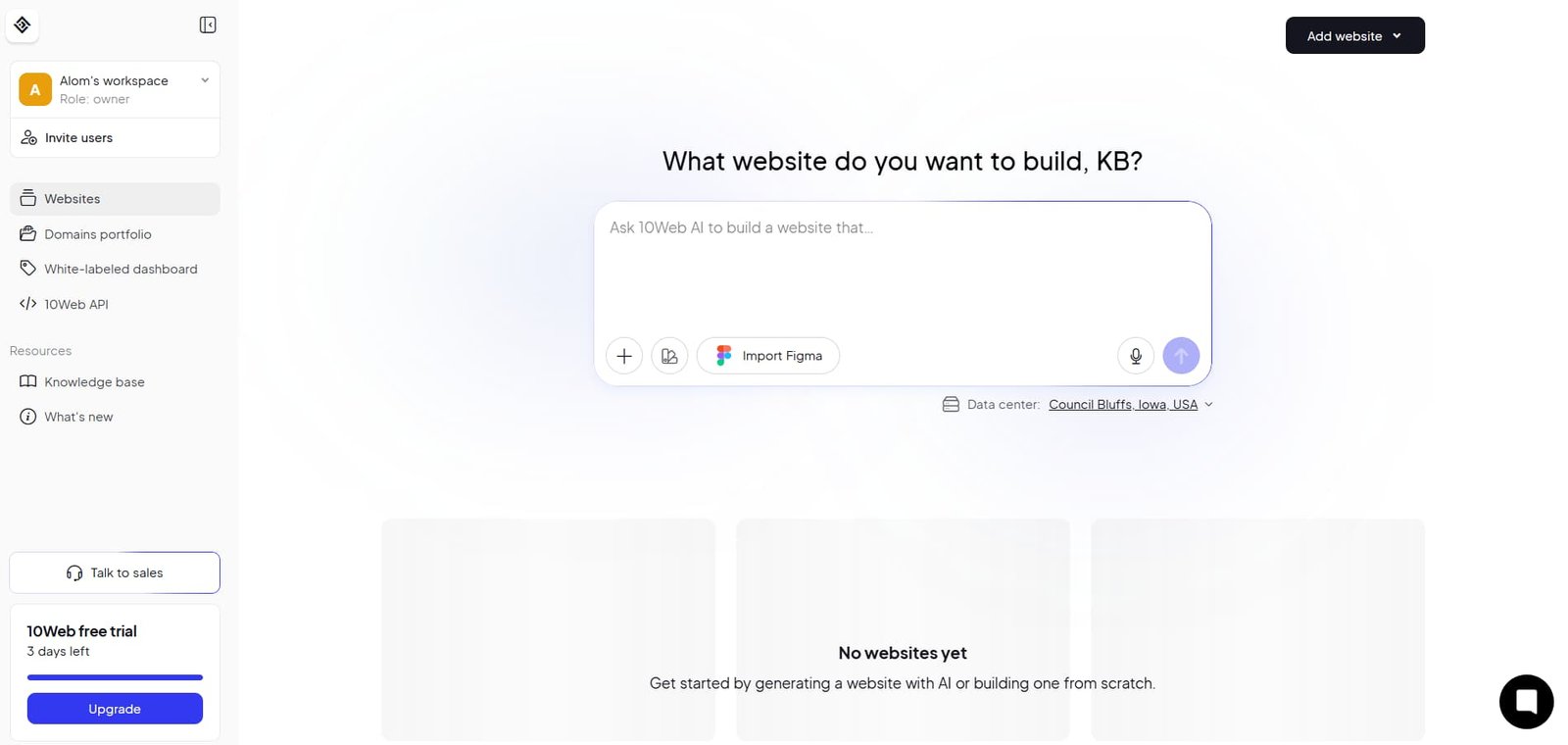
Alom's Workspace
At the top of the dashboard, you will see the name of your workspace. You can think of a workspace as a project or office where all your websites, team members, and account settings are stored.If you build websites for different clients in the future, you can create a separate workspace for each client. This helps keep all your projects organized and easy to manage.
Role: Owner
Below the workspace name, you will see Role: Owner. This means you are the owner of the workspace and have full control over it. You can create websites, invite team members, manage billing, and change any account settings whenever needed.
Websites
The Websites section is one of the most important parts of the dashboard. Here you can see all the websites you have created.
From this section, you can create a new website, open an existing one, check its status, and manage it. If your account contains multiple websites, they will all be listed here.
Domains Portfolio
The Domains Portfolio section allows you to manage your domains.If you purchased your domain from another domain registrar, you can connect it to your website here. If you own multiple domains, you can manage all of them from this section.
Add Website
The Add Website button is the most frequently used option in the dashboard.Whenever you want to create a new website, click this button. It launches the AI Website Builder, which will ask you a few questions about your website before generating it.
What Website Do You Want to Build?
This is the first and most important step in the AI Website Builder. It is where you tell the AI what type of website you want to create, such as a business website, blog, portfolio, online store, or another type of website.The information you provide here is the foundation for the website that the AI generates.Many beginners type only two or three words, such as Restaurant Website, Portfolio, or Online Store. The AI will still generate a website, but the result is usually very basic because it does not have enough information to understand your requirements.
Think of this input box as a conversation with the AI. The more clearly and accurately you describe your website, the better the final result will be.Instead of entering only a website name, you should explain:
- What type of business the website is for.
- What products or services the business offers.
- The main purpose of the website.
- Who the target audience is.
- What style or design you want.
- Which pages should be included.
If you include all of this information in a single prompt, the AI can better understand your requirements and generate a much more professional website.
Example 1: Weak Prompt
Create a website for my digital marketing agency. This prompt is too short. The AI can build a website, but it does not know what type of agency you run, who your target audience is, or what design style you prefer.
Example 2: Good Prompt
Create a modern and professional website for my digital marketing agency. My agency provides SEO, Google Ads, Social Media Marketing, and Website Development services for small businesses and startups. I want a clean blue and white color theme with a professional layout. Include Home, About, Services, Portfolio, Testimonials, Blog, and Contact pages. The website should be mobile-friendly, fast-loading, and optimized for lead generation.
This prompt gives the AI enough information to generate a website that closely matches your business goals and design preferences.
Example 3: E-commerce Store Prompt
Build a modern eCommerce website for selling men's fashion products. The website should have a clean and premium design with product categories, featured products, customer reviews, a shopping cart, secure checkout, About Us, Contact Us, and FAQ pages. Use a black and white color scheme and create a professional shopping experience.
This prompt clearly explains the business type, required features, design preferences, and website structure, allowing the AI to generate a much better online store.
What Should You Do After Your Website Is Generated?
Once 10Web AI Builder finishes generating your website, many people think it is ready to publish immediately. However, I always recommend reviewing your AI-generated website before making it live. AI creates a strong first draft, but it is still your responsibility to turn it into a truly professional website. Before publishing, take some time to review and customize everything carefully.
Review the Entire Website
Start by going through your website from beginning to end. Open every page and check whether the design looks good, the sections are in the right place, and the layout is working properly.Sometimes the AI adds extra sections or includes content that may not be relevant to your business. If you find anything unnecessary, remove it to keep your website clean and professional.
Edit the Content
The content generated by AI is only a starting point. You should never publish it without reviewing it first.Read every heading and paragraph carefully. Replace the sample text with information about your own business. Add your company name, services, contact details, and any other important information. The more original your content is, the more professional and trustworthy your website will appear.
Replace the Images
AI may use stock photos or placeholder images when generating your website.Whenever possible, replace these with original photos of your company, office, products, team, or services. Real images make your website more authentic and help build trust with your visitors.
Customize Your Branding
Next, review your website's logo, brand colors, and fonts.If the AI-generated design does not match your brand identity, customize it. Every business has its own unique style, and your website should reflect that identity consistently.
Add Important Pages
If your website does not already include pages such as About Us, Services, Contact Us, Privacy Policy, or Terms and Conditions, create them before publishing.These pages are essential for a professional website. If you plan to publish articles, you should also create a dedicated Blog page.
Test Buttons and Links
Before making your website live, test every button and link.Click each button to make sure it takes visitors to the correct page. Submit the contact form to confirm that it works properly. If you have added social media links, verify that they open the correct profiles.
How Does 10Web AI Builder Work with Elementor?
If you have used WordPress before, you have probably heard of Elementor. One of the biggest advantages of 10Web AI Builder is that it not only generates a website with AI but also integrates that website with Elementor. This makes editing and customizing your website much easier.
When the AI generates your website, it does much more than create a simple preview with text and images. Behind the scenes, it creates actual WordPress pages and prepares them in a format that is fully compatible with Elementor. As a result, once your website is generated, you can open it directly in the Elementor Editor and start making changes immediately.
For example, if the AI creates your homepage and you want to change the hero section background image, update the main heading, or modify the button color, you do not need any coding skills. Simply click Edit with Elementor, select the element you want to edit, and make your changes using the visual editor.
Drag-and-Drop Editing
Elementor is a drag-and-drop page builder, which means you can build and edit your website visually without writing any code.
If you want to move a section higher or lower on the page, simply drag it with your mouse and drop it into the new position. If you want to add new sections such as an FAQ, contact form, pricing table, or image gallery, you can drag the required Elementor widgets onto the page and customize them in just a few clicks.
Easily Remove or Add Sections
Sometimes the AI may create sections that are not relevant to your business. If that happens, you can remove those sections with a single click.Similarly, if you want to add more information or create new sections, Elementor makes the process simple. You can expand your website without affecting the overall layout or design.
Real-Time Editing
Another major benefit of the 10Web and Elementor integration is real-time editing.
As you update headings, replace images, change colors, or edit text, you can instantly see the results on the screen. This allows you to make design decisions quickly without repeatedly opening a preview window.
Responsive Editing
Responsive editing is another powerful feature of Elementor.You can switch between Desktop, Tablet, and Mobile views to see how your website looks on different devices. If the spacing, font size, or layout does not look right on mobile, you can adjust it specifically for mobile devices without changing the desktop version.
My Final Experience and Honest Opinion
After using 10Web AI Builder extensively, creating different types of websites, and testing its features, I can say that my overall experience has been very positive. Like any other tool, it has its strengths and a few limitations. In this section, I want to share my opinion based on my own experience using the platform.
The first thing that impressed me was the speed. In the past, creating the basic structure of a website could take several hours or even days. With 10Web AI Builder, the first version of the website was ready in just a few minutes. This saves a significant amount of development time and allows you to focus more on customization instead of starting from scratch.
Another thing I liked is that the AI does not simply copy a generic template. If you provide clear and detailed information about your business, it tries to generate a website with a layout, sections, and content that match your requirements. The results may not be perfect every time, but they provide a strong foundation that is much easier to refine than building a website from the beginning.
One of the most useful features for me was the Elementor integration. After the website was generated, I did not need to write any code. I simply opened the website in Elementor and edited the text, images, colors, and sections to match my needs. This makes the platform beginner-friendly while also helping experienced developers complete projects much faster.
Overall, I believe 10Web AI Builder is an excellent tool for anyone who wants to build a professional WordPress website quickly. It is especially useful for beginners, freelancers, bloggers, small business owners, and agencies that want to save time without sacrificing quality.That said, it is important to have realistic expectations.
AI should not be viewed as a complete replacement for a web developer. Instead, think of it as a smart assistant that handles most of the initial work for you. You should still review the website, improve the content, customize the design, optimize the SEO, and make sure everything reflects your brand.If you use 10Web AI Builder in the right way and spend a little time refining the AI-generated website, you can create a final result that looks modern, professional, and ready for real-world use.
Frequently Asked Questions
Is 10Web AI Builder Good for Beginners?
Yes. Even if you have never built a website before, you can use 10Web AI Builder to create a basic business website. The AI guides you through the process, making it simple for beginners to get started.
Do I Need Coding Skills?
No. You do not need any coding knowledge to build a basic website with 10Web AI Builder. Most tasks can be completed using AI and the visual editor.
Does It Work with WordPress?
Yes. 10Web AI Builder is built on the WordPress platform, giving you access to the flexibility and features of the WordPress ecosystem.
Does It Support Elementor?
Yes. AI-generated websites are fully compatible with Elementor, allowing you to edit pages easily using the drag-and-drop editor without writing code.
Should I Publish AI-Generated Content Without Editing?
No. You should always review and edit AI-generated content before publishing. Add your own business information, improve the wording where needed, and check the grammar to ensure the content is accurate and professional.
Can I Build an eCommerce Website with 10Web AI Builder?
Yes. You can create online stores and product-based websites using 10Web AI Builder. It also works well with WooCommerce, making it easier to build and manage an eCommerce business.
Is It a Good Choice for Blogging?
Yes. 10Web AI Builder is a good option for creating a blogging website. However, the success of your blog depends on publishing high-quality content, following good SEO practices, and posting new articles consistently.
How to Get Clients from LinkedIn
Best 5 AI Tools for Developers